
QR Ordering Built
Around Your Workflow
Counter-approved, direct-to-kitchen, or waiter-led — 3A Dine adapts to how your restaurant actually runs. No hardware. Customers order instantly from their browser.
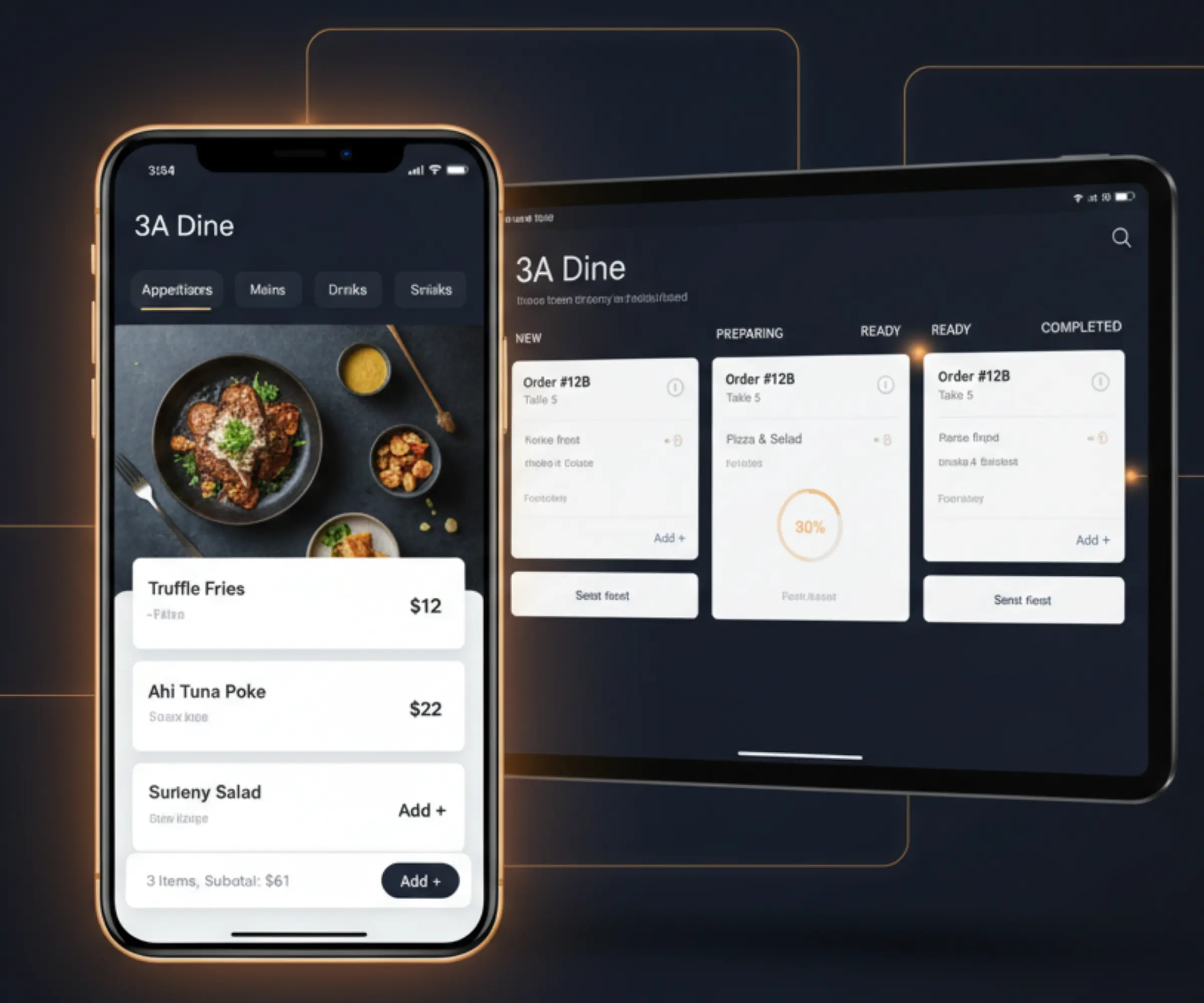
From signup to customers scanning at the table.
Guests scan and order instantly from any browser.
QR self-order, Waiter POS, or counter-only.
Your workflow, your rules
Every restaurant is different. 3A Dine lets you choose — and change — how orders flow from customer to kitchen.
Counter-approved
- 1Customer scans QR & orders
- 2Counter reviews the order
- 3Counter accepts → Kitchen
- 4Kitchen marks READY
Full control over what goes to the kitchen. Best for dine-in with payment-first flow.
Direct to kitchen
- 1Customer scans QR & orders
- 2Order goes straight to KDS
- 3Kitchen prepares
- 4Counter collects payment
Maximum speed — no approval step. Best for QSRs and high-volume counters.
Waiter-led
- 1Waiter opens POS on tablet
- 2Browses menu & places order
- 3Order appears on KDS
- 4Kitchen marks READY
Full table service — customers never touch a QR. Staff handle everything on tablet.
BUILT FOR UK, EUROPE, INDIA & BEYOND
Multi-language, per branch
Set each branch to the language that fits its local customers and staff — English in London, French in Paris, Dutch in Amsterdam, German in Berlin, Hindi in Delhi, Marathi in Mumbai, Tamil in Chennai, or Gujarati in Ahmedabad.
Customer menus, kitchen tickets, and POS screens can be localised per branch. No developer work needed.
Everything in one platform
No third-party integrations needed. QR ordering, kitchen display, payments, analytics, and team management — all included.
Why restaurants choose 3A Dine
How we compare
Most platforms make you buy hardware, pay per transaction, or lock your workflow. 3A Dine stays flexible, browser-first, and restaurant-friendly.
Simple, transparent pricing
Start with Growth. Add branches only when you need them.
- ✓1 branch included
- ✓QR menu & ordering
- ✓Waiter POS
- ✓Kitchen display (KDS)
- ✓Pay-at-counter support
- ✓Online payments via connected gateway
- ✓Promotions & sliders
- ✓Roles & permissions
- ✓Reports & analytics
- ✓Add extra branches anytime
- ✓Everything in Growth
- ✓Multi-branch rollout support
- ✓Custom integrations
- ✓Dedicated onboarding
- ✓Priority support
- ✓Migration support if required
Runs on Android, iOS, tablets, and existing PCs — no POS hardware required.
FAQ
Common questions
Everything you need to know before getting started with 3A Dine.
Do customers need to install an app?
No. Customers scan a QR code and the menu opens instantly in their browser - no download, no sign-in required. 3A Dine is PWA-ready if you want an install-like shortcut on the home screen.
Can I skip the counter approval step?
Yes. Each branch can be set to counter-approved, direct-to-kitchen, or waiter-led mode. You can mix modes across branches - counter approval at your dine-in outlet and direct-to-kitchen at your express counter.
Can waiters take orders on a tablet?
Yes. 3A Dine includes a Waiter POS mode so staff can browse the full menu and place orders on behalf of customers from a tablet. Perfect for table service where customers don't scan a QR.
Can I run different languages per outlet?
Yes. Languages are set at branch level - English in London, French in Paris, Dutch in Amsterdam, German in Berlin, Hindi in Delhi, or another enabled localisation. Customer menus, KDS, and POS can be localised per branch where supported or planned configuration is enabled.
Can I manage multiple branches from one account?
Yes. Growth includes 1 branch, and extra branches can be added at the country price shown in the pricing section. For chains, franchises, large rollouts, custom integrations, dedicated onboarding, migration support, or priority support, contact sales for Custom pricing.
Can I take online payments?
Yes. Pay-at-counter is available, and online payments can be enabled through the supported payment gateway for your country.
For India, 3A Dine uses Razorpay.
For the UK, Europe, and other supported countries, 3A Dine uses Stripe.
You connect your own active payment gateway account. 3A Dine does not store card details and does not hold your customer payments.
How do online payments work?
Your restaurant connects its own payment gateway account.
India-based restaurants connect Razorpay.
UK, Europe, and other supported countries connect Stripe.
When a customer pays online, the payment is processed securely by the gateway and settled according to your gateway account settings. 3A Dine does not hold or touch your funds. You remain the merchant of record for your restaurant payments.
Which payment gateway is used in my country?
India uses Razorpay. UK, Europe, and other supported countries use Stripe. The available gateway may depend on your restaurant country, provider support, and account eligibility.
Do I need my own Stripe or Razorpay account?
Yes. Your restaurant should connect its own active payment gateway account. This helps ensure payments, payouts, refunds, and verification are handled directly between your restaurant and the payment provider.
Does 3A Dine store customer card details?
No. 3A Dine does not store confidential card details. Card and payment information is handled securely by Stripe or Razorpay.
Does 3A Dine hold my restaurant funds?
No. 3A Dine does not hold or touch your customer payments. Online payments are processed by your connected payment gateway and settled according to your gateway account settings.
Can customers still pay at the counter?
Yes. Pay-at-counter is supported. You can use 3A Dine for QR ordering, waiter POS, kitchen workflow, and reports even when the customer pays at the counter.
What happens if an online payment shows pending confirmation?
A payment may show pending confirmation while 3A Dine waits for confirmation from the payment gateway. Check the payment status, webhook/gateway sync, and refresh the order/payment screen. If the issue continues, contact support.
Can I use both pay-at-counter and online payments?
Yes. Branches can support pay-at-counter and online payments where enabled. This is useful for restaurants that want to accept counter payments for dine-in orders and online payments for selected order flows.
Who manages refunds?
Refunds should be managed through the connected payment provider, such as Stripe or Razorpay, depending on your restaurant country and payment setup.
Do I need POS hardware?
No. 3A Dine runs on any smartphone, tablet, or existing PC with a browser. No dedicated hardware required.
Talk to Sales
Tell us about your outlet and we'll configure a pilot and have your first QR menu live from 30 minutes.
Fill in the details and we'll be in touch within a few hours.